Contents:
.innerHeight()Returns: Number
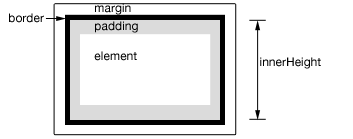
Description: Get the current computed height for the first element in the set of matched elements, including padding but not border.
-
version added: 1.2.6.innerHeight()
- This method does not accept any arguments.
This method returns the height of the element, including top and bottom padding, in pixels. If called on an empty set of elements, returns undefined (null before jQuery 3.0).
This method is not applicable to window and document objects; for these, use .height() instead.
Additional Notes:
-
The number returned by dimensions-related APIs, including
.innerHeight(), may be fractional in some cases. Code should not assume it is an integer. Also, dimensions may be incorrect when the page is zoomed by the user; browsers do not expose an API to detect this condition. -
The value reported by
.innerHeight()is not guaranteed to be accurate when the element or its parent is hidden. To get an accurate value, ensure the element is visible before using.innerHeight(). jQuery will attempt to temporarily show and then re-hide an element in order to measure its dimensions, but this is unreliable and (even when accurate) can significantly impact page performance. This show-and-rehide measurement feature may be removed in a future version of jQuery.
Example:
Get the innerHeight of a paragraph.
|
1
2
3
4
5
6
7
8
9
10
11
12
13
14
15
16
17
18
19
20
21
22
23
24
25
26
|
|
Demo:
.innerHeight( value )Returns: jQuery
Description: Set the CSS inner height of each element in the set of matched elements.
-
version added: 1.8.innerHeight( value )
-
valueA number representing the number of pixels, or a number along with an optional unit of measure appended (as a string).
-
-
version added: 1.8.innerHeight( function )
-
functionA function returning the inner height (including padding but not border) to set. Receives the index position of the element in the set and the old inner height as arguments. Within the function,
thisrefers to the current element in the set.
-
When calling .innerHeight("value"), the value can be either a string (number and unit) or a number. If only a number is provided for the value, jQuery assumes a pixel unit. If a string is provided, however, any valid CSS measurement may be used for the height (such as 100px, 50%, or auto). Note that in modern browsers, the CSS height property does not include padding, border, or margin, unless the box-sizing CSS property is used.
If no explicit unit is specified (like "em" or "%") then "px" is assumed.
Example:
Change the inner height of each div the first time it is clicked (and change its color).
|
1
2
3
4
5
6
7
8
9
10
11
12
13
14
15
16
17
18
19
20
21
22
23
24
25
26
27
28
29
30
31
32
33
34
35
36
37
38
39
40
|
|