jQuery API

.height()

Contents:

.height() Returns: Integer

Description: Get the current computed height for the first element in the set of matched elements.

  • version added: 1.0.height()

The difference between .css('height') and .height() is that the latter returns a unit-less pixel value (for example, 400) while the former returns a value with units intact (for example, 400px). The .height() method is recommended when an element's height needs to be used in a mathematical calculation.
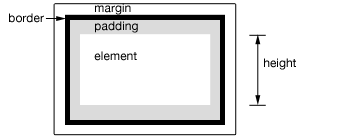
This method is also able to find the height of the window and document.

$(window).height();   // returns height of browser viewport
$(document).height(); // returns height of HTML document

Note that .height() will always return the content height, regardless of the value of the CSS box-sizing property.

Note: Although style and script tags will report a value for .width() or height() when absolutely positioned and given display:block, it is strongly discouraged to call those methods on these tags. In addition to being a bad practice, the results may also prove unreliable.

Example:

Show various heights. Note the values are from the iframe so might be smaller than you expected. The yellow highlight shows the iframe body.

<!DOCTYPE html>
<html>
<head>
  <style>
  body { background:yellow; }
  button { font-size:12px; margin:2px; }
  p { width:150px; border:1px red solid; }
  div { color:red; font-weight:bold; }
  </style>
  <script src="http://code.jquery.com/jquery-latest.js"></script>
</head>
<body>
  <button id="getp">Get Paragraph Height</button>
  <button id="getd">Get Document Height</button>
  <button id="getw">Get Window Height</button>

  <div>&nbsp;</div>
  <p>
    Sample paragraph to test height
  </p>
<script>
    function showHeight(ele, h) {
      $("div").text("The height for the " + ele + 
                    " is " + h + "px.");
    }
    $("#getp").click(function () { 
      showHeight("paragraph", $("p").height()); 
    });
    $("#getd").click(function () { 
      showHeight("document", $(document).height()); 
    });
    $("#getw").click(function () { 
      showHeight("window", $(window).height()); 
    });

</script>

</body>
</html>

Demo:

.height( value ) Returns: jQuery

Description: Set the CSS height of every matched element.

  • version added: 1.0.height( value )

    valueAn integer representing the number of pixels, or an integer with an optional unit of measure appended (as a string).

  • version added: 1.4.1.height( function(index, height) )

    function(index, height)A function returning the height to set. Receives the index position of the element in the set and the old height as arguments. Within the function, this refers to the current element in the set.

When calling .height(value), the value can be either a string (number and unit) or a number. If only a number is provided for the value, jQuery assumes a pixel unit. If a string is provided, however, a valid CSS measurement must be provided for the height (such as 100px, 50%, or auto). Note that in modern browsers, the CSS height property does not include padding, border, or margin.

If no explicit unit was specified (like 'em' or '%') then "px" is concatenated to the value.

Note that .height(value) sets the height of the box in accordance with the CSS box-sizing property. Changing this property to border-box will cause this function to change the outerHeight of the box instead of the content height.

Example:

To set the height of each div on click to 30px plus a color change.

<!DOCTYPE html>
<html>
<head>
  <style>div { width:50px; height:70px; float:left; margin:5px;
        background:rgb(255,140,0); cursor:pointer; }  </style>
  <script src="http://code.jquery.com/jquery-latest.js"></script>
</head>
<body>
  <div></div>
  <div></div>

  <div></div>
  <div></div>
  <div></div>
<script>$("div").one('click', function () {
      $(this).height(30)
             .css({cursor:"auto", backgroundColor:"green"});
    });</script>

</body>
</html>

Demo:

Support and Contributions

Need help with .height() or have a question about it? Visit the jQuery Forum or the #jquery channel on irc.freenode.net.

Think you've discovered a jQuery bug related to .height()? Report it to the jQuery core team.

Found a problem with this documentation? Report it on the GitHub issue tracker

  • mmbee

    In demo #1, the document and window height is showing weird numbers???

    • http://www.learningjquery.com/ Karl Swedberg

      “Note the values are from the iframe so might be smaller than you expected.”

  • wZyla

    In Safari 4.0.4 $(window).height() and $(document).height() return different values than stated in description. $(document).height() returns height of the window, $(window).height() returns height of html document.

    • RobG

      Inspecting the element in Safari 5.0.2 shows the HTML element height is 112px, but the demo says the “document” height is 125px – that is the height of the “window”, i.e. iframe.

      Which one is correct?

  • Greg

    See also innerHeight() and outerHeight() when you want to include padding / borders / margins.

    • Mark Wylde

      You're brilliant. Thanks a lot mate!

  • Etienne Dupuis

    I had to make the left banner the same height as the content div, my banner was positioned absolute and was causing problems to stretch all the way down. This did the trick :

    $(“#div1″).height( $(“#div2″).height() );

  • Leloup

    In firefox
    The height for the document and windows are 125px, even if i resize the browser

    • http://ender.forteca.pl/ Marcin Pietrzak

      It’s because the demo is in the iframe. Iframe have 125px height.

  • https://me.yahoo.com/a/OK1tNaZulJxN5dbQNLz1SiVihbNgUl_IlEFkow--#9c738 George Edison

    There seems to be an issue with setting height to 0 in IE and then animating the item.

    See http://stackoverflow.com/questions/2686836/how-… for more details.

  • cycledude

    Hi

    The height in ie8 gives different results to that of chrome or firefox…

    eg:

    Paragraph height

    ie8: 38px
    chrome: 40px
    firefox: 40px

    Document Height:
    ie8: 121px
    firefox: 125px
    chrome: 125px

    Why does IE give incorrect results? I am having problems with a script at the moment which resizes a div based on the content, but in IE it does not resize correctly (as in this example)… even if I use outerHeight(true) it gives incorrect results!

    • Smith

      I have the same problem here. I don't know what height jQuery calculates here, but it seems not to be the real height, but the css-height. If I use the prototype-pendant .getHeight() I get the correct height.

  • http://profiles.yahoo.com/u/S5UNXCCXXARARW2W7E3BX4A7J4 CoRKy

    I was unable to set the height of a div correctly in IE8 using $(“#divID”).height(100);, but it was working fine in IE7, Chrome, and FF. I found that using $(“#divID”).css(‘height’, ’100′); would work correctly in all browsers.

    • Ebuychance

      I noticed an element set to a height of 5.75em [w/12px font-size (= 69px)] via a CSS file return 70 (px) in IE8 with obj.height() !! Yet parseFloat(obj.css('height')) returns the expected 69 (px)…. This is only in IE8.

  • http://www.ciftcioglumobilya.com Ciftcioglumobilya

    See also innerHeight() and outerHeight() when you want to include padding / borders / margins

  • Akim_v

    In firefox $(window).height includes height of bookmark bar and navigation bar. It's easy to check using code: $(div).height($(window).height()) and one div element.

  • Joe de Ronde

    Hi there,

    I have a problem with using this function.

    In firefox it works fine in IE however it breaks (height returns a rediculessly large number)

    you can see this code at:

    http://experiences.next.co.uk/Step3_SignatureGift.aspx?corpid=8114&SGType=SGProductId&SGId=120&SGActCode=NHNP

    if anyone could point out to me why IE is returning such a large number that would be greatly appreciated.

    Cheers

    Joe.

  • http://twitter.com/metamorpher Josemilio

    Hi all. I have a several div layers, everyone of them with the class name “item”. I determine a variable with the name items = $('.item');

    When I go into a bucle, to retrieve every height individually, I only get the highest value, I mean the tallest div is the only value I got.

    Here's my code:
    for(i=0; items.length > i; i++){
    $(“.test”).append(“

    “+ i + ” : ” + items.height() +”

    “);
    }

    Why it doesn't get the value for every item? Already tried items[i].height(), unsuccessfully I must say. Thanks for your time :)

  • Musa

    When I use $(“#divId”).height() I don't get the actual height of the div in chrome and safari (but i did in ie and ff), what it looks like it gives the height of the visible document when maximized, i tried DOM.offsetHeight and DOM.clientHeight and it gave similar(if not exact) results.
    The div in question was not explicitly given a height but it was given width in px and margins in px(top, bottom) and auto(left, right) via styles.
    I call the code from $(document).ready(), if i put an alert() after the .height() call in chrome and safari the page isn't fully displayed at that point.

    • Musa

      Okay I tried calling it from $(window).load() and it worked.
      I guess it was the images, if i set heights for images $(document).ready works too.

  • Capy

    Sorry in my last post html was stripped. here is the link: http://es.wikipedia.org/wiki/Quirks_Mode

  • Sam Vloeberghs

    When trying to determine the height or width of an image, don't use the '.ready()' event but instead , attach a function to the onload event like this:

    f.e.:

    .ready() doesn't garantuee that the images are loaded..