jQuery API

.fadeOut()

.fadeOut( [duration] [, callback] ) Returns: jQuery

Description: Hide the matched elements by fading them to transparent.

  • version added: 1.0.fadeOut( [duration] [, callback] )

    durationA string or number determining how long the animation will run.

    callbackA function to call once the animation is complete.

  • version added: 1.4.3.fadeOut( [duration] [, easing] [, callback] )

    durationA string or number determining how long the animation will run.

    easingA string indicating which easing function to use for the transition.

    callbackA function to call once the animation is complete.

The .fadeOut() method animates the opacity of the matched elements. Once the opacity reaches 0, the display style property is set to none, so the element no longer affects the layout of the page.

Durations are given in milliseconds; higher values indicate slower animations, not faster ones. The strings 'fast' and 'slow' can be supplied to indicate durations of 200 and 600 milliseconds, respectively. If any other string is supplied, or if the duration parameter is omitted, the default duration of 400 milliseconds is used.

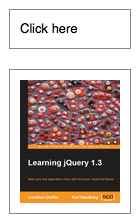
We can animate any element, such as a simple image:

<div id="clickme">
  Click here
</div>
<img id="book" src="book.png" alt="" width="100" height="123" />

With the element initially shown, we can hide it slowly:

$('#clickme').click(function() {
  $('#book').fadeOut('slow', function() {
    // Animation complete.
  });
});

Note: To avoid unnecessary DOM manipulation, .fadeOut() will not hide an element that is already considered hidden. For information on which elements jQuery considers hidden, see :hidden Selector.

Easing

As of jQuery 1.4.3, an optional string naming an easing function may be used. Easing functions specify the speed at which the animation progresses at different points within the animation. The only easing implementations in the jQuery library are the default, called swing, and one that progresses at a constant pace, called linear. More easing functions are available with the use of plug-ins, most notably the jQuery UI suite.

Callback Function

If supplied, the callback is fired once the animation is complete. This can be useful for stringing different animations together in sequence. The callback is not sent any arguments, but this is set to the DOM element being animated. If multiple elements are animated, it is important to note that the callback is executed once per matched element, not once for the animation as a whole.

As of jQuery 1.6, the .promise() method can be used in conjunction with the deferred.done() method to execute a single callback for the animation as a whole when all matching elements have completed their animations ( See the example for .promise() ).

Additional Notes:

  • All jQuery effects, including .fadeOut(), can be turned off globally by setting jQuery.fx.off = true, which effectively sets the duration to 0. For more information, see jQuery.fx.off.

Examples:

Example: Animates all paragraphs to fade out, completing the animation within 600 milliseconds.

<!DOCTYPE html>
<html>
<head>
  <style>
  p { font-size:150%; cursor:pointer; }
  </style>
  <script src="http://code.jquery.com/jquery-latest.js"></script>
</head>
<body>
  <p>
  If you click on this paragraph
  you'll see it just fade away.
  </p>
<script>
  $("p").click(function () {
  $("p").fadeOut("slow");
  });
  </script>

</body>
</html>

Demo:

Example: Fades out spans in one section that you click on.

<!DOCTYPE html>
<html>
<head>
  <style>
  span { cursor:pointer; }
  span.hilite { background:yellow; }
  div { display:inline; color:red; }
  </style>
  <script src="http://code.jquery.com/jquery-latest.js"></script>
</head>
<body>
  <h3>Find the modifiers - <div></div></h3>
  <p>
  If you <span>really</span> want to go outside
  <span>in the cold</span> then make sure to wear
  your <span>warm</span> jacket given to you by
  your <span>favorite</span> teacher.
  </p>
<script>

  $("span").click(function () {
  $(this).fadeOut(1000, function () {
  $("div").text("'" + $(this).text() + "' has faded!");
  $(this).remove();
  });
  });
  $("span").hover(function () {
  $(this).addClass("hilite");
  }, function () {
  $(this).removeClass("hilite");
  });

  </script>

</body>
</html>

Demo:

Example: Fades out two divs, one with a "linear" easing and one with the default, "swing," easing.

<!DOCTYPE html>
<html>
<head>
  <style>
.box,
button { float:left; margin:5px 10px 5px 0; }
.box { height:80px; width:80px; background:#090; }
#log { clear:left; }

</style>
  <script src="http://code.jquery.com/jquery-latest.js"></script>
</head>
<body>
  
<button id="btn1">fade out</button>
<button id="btn2">show</button>

<div id="log"></div>

<div id="box1" class="box">linear</div>
<div id="box2" class="box">swing</div>

<script>
$("#btn1").click(function() {
  function complete() {
    $("<div/>").text(this.id).appendTo("#log");
  }
  
  $("#box1").fadeOut(1600, "linear", complete);
  $("#box2").fadeOut(1600, complete);
});

$("#btn2").click(function() {
  $("div").show();
  $("#log").empty();
});

</script>

</body>
</html>

Demo:

Support and Contributions

Need help with .fadeOut() or have a question about it? Visit the jQuery Forum or the #jquery channel on irc.freenode.net.

Think you've discovered a jQuery bug related to .fadeOut()? Report it to the jQuery core team.

Found a problem with this documentation? Report it on the GitHub issue tracker

  • http://thefron.me Hoseong Hwang

    It seems that, in IE, fading animation doesn’t show any effect when fade is applied to fade inline element. It just disappears without effect. Works well when applied to block element.

    • Anonymous

      I had the same problem. However, if you are trying to apply it to then you must assign an id to the and select all , example:
      $(“#sow_12 td”).fadeOut(‘slow’), where sow_12 is the row id

      • http://www.zahipedia.com Zahidraf

        any body suggest me how to fade in and fade out for two div

        • http://www.tape4backup.com Rozy

          @Zahidraf same question is in my mind..please any one answer us

  • Marek

    When usings fadeOut in ajax ‘beforeSend’ section, jquery doens’t wait till the end of animation, but process ‘success’ section immediately

  • Anonymous

    If you’d like to send arguments to your callback function, you may define a new anonymous function that calls your parameterized function. For example:

    var pageUrl = generateNextPageUrl();
    $(“#content”).fadeOut(1000, function () { refreshContent(pageUrl) });

    Without the anonymous function definition, my suposed callback was called immediatly without waiting to finish the fadeout effect.

  • donrhummy

    How do I do a partial fadeOut? I only want to fade to 25% transparent.

    • http://www.learningjquery.com/ Karl Swedberg

      Use the .fadeTo() method

    • http://www.learningjquery.com/ Karl Swedberg

      Use the .fadeTo() method

  • donrhummy

    How do I do a partial fadeOut? I only want to fade to 25% transparent.

  • Simon

    .fadeOut() doesn't seem to work in IE8 with alphatransparent background pngs, when you fade only to a certain degree.

    For example, when you have a div with an alphatransparent PNG as background-image and try to fade it like this:

    $('#my-image').fadeTo(0, 0.4);

    it leads to a faded image with the transparent area becoming grey. I guess this is an IE problem rather than a jQuery issue.

    • John

      Did you find any way to avoid this transparency problem?

  • vishal

    Is there a way to not make the div remove from the dom when fading out? When I fade out a status div, it moves my form around.

    • vishal

      Got it:
      $(“#status”).fadeTo(“slow”,0);

  • http://pulse.yahoo.com/_KWA7IGUJF64EKPDKVI4WZZ3COI Manu

    For me the callback is getting called twice, once while fading out and once while fading in. See the code below:

    var startIdx = 10;
    var endIdx = 15;
    var counter = 1
    tableBody.fadeOut(1000, function(){
    console.log(counter++);
    tableBody
    .find(“tr”).hide()
    .filter(function(idx){
    return idx >= startIdx && idx <= endIdx;
    }).show();
    tableBody.fadeIn(1000);
    });

    What I am trying to do here is to fadeOut the TBODY, and on its completion hide all the TRs then show only the TRs with index 10-15, and then fadeIn the TBODY.

    But I am facing 2 problems:
    1. console.log is firing twice
    2. The first time console.log fires is before the fadeOut completes. I want it to fire exactly after completing the animation

    Anyone else faced this problem??

  • Jangla

    I have to select multiple html elements – simply no way round it – but only want to run a callback method once all the fadeOut's are complete. This is apparently against the flow of jQuery's fadeOut so does anyone have any ideas how I can achieve this?

    • http://pulse.yahoo.com/_KWA7IGUJF64EKPDKVI4WZZ3COI Manu

      you can try something like this

      var collection = $(“p”);
      var counter = collection.length;
      collection.fadeOut(“slow”, function(){
      counter–;
      if ( !counter ){
      // Do your stuff
      }
      });

  • http://pulse.yahoo.com/_KWA7IGUJF64EKPDKVI4WZZ3COI Manu

    you can try something like this

    var collection = $(“p”);
    var counter = collection.length;
    collection.fadeOut(“slow”, function(){
    counter–;
    if ( !counter ){
    // Do your stuff
    }
    });

  • http://twitter.com/shadowelder4 shadow elder

    I think the call in jQuery 1.4x. is now
    .fadeOut( [ duration ], [easing],[ callback ] )

    • http://www.learningjquery.com/ Karl Swedberg

      I know, but I'm reluctant to change it at this point because currently only two of the three parameters can be used at a time. If you try using all three, the callback function won't execute. I'm hoping that the next version of jQuery will resolve that issue.

  • Davidhunternyc

    Is there a fadeout 'veryslow'? I would like the fade out to last longer than 600ms.

  • bbabics

    fadeOut() doesn't seem to work for Blackberry 9700.

  • Chris

    How do you use fadeOut without a click command?

  • Higops

    Hi,

    How to fade and asp label or span id after 5 seconds

  • Cyd

    Can we get an example with easing in it, for the 1.4.3 version? I tried adding an easing parameter, and the code just stops working. Of course, I can't find a single description anywhere of the possible easing values, so maybe none of the ones I've tried are valid for this function. If I simply pass duration and callback, it works just fine.

    • http://www.learningjquery.com/ Karl Swedberg

      Sorry about that. I just updated the documentation with a paragraph about easing, so that should help clarify things a bit. I'll also drop in an example as soon as I get a chance.

  • gumpy1

    NOTE: CORRECTION TO MY CORRECTION
    I accidentally included 2 tags. There should only be 1.

  • Randall313

    Hi,
    I have this function calling a error on my form and on click (on the pop up) the error message disappears.
    $(“.Error”).live(“click”,function(){
    $(this).fadeOut(150,function(){ $(this).remove()
    })
    })
    };

    what I need to find out is how to make the pop up fadeout without clicking it but automatically after a set amount of time (say 45 seconds) I have tried this

    $(“.Error”).animate({opactiy: 1.0 } fadeOut('slow', function() {
    $(this).remove()
    });
    }
    }, 3000);

    But it's not giving me the auto fade away.

    Please help!

  • CeIeNEKa

    demo in example 2 doesn't work for me in IE8

    I've got other problem with IE, i've found out that it happens when there is one div(second) inside another(first). When i use fadeout on first div, firs is fading correctly but second is not fading at all. Any idea why/how to fix it?

    • http://www.mateuscorreia.com.br Mateus Correia

      Im having the same issues… Did you found a way to fix this?

  • John

    Did you find any way to avoid this transparency problem?

  • Mylesmadness

    If you don't know what standards are then this site isn't for you.