.animate( properties [, duration ] [, easing ] [, complete ] )Returns: jQuery
Description: Perform a custom animation of a set of CSS properties.
-
version added: 1.0.animate( properties [, duration ] [, easing ] [, complete ] )
-
propertiesType: PlainObjectAn object of CSS properties and values that the animation will move toward.
-
duration (default:
400)A string or number determining how long the animation will run. -
easing (default:
swing)Type: StringA string indicating which easing function to use for the transition. -
completeType: Function()A function to call once the animation is complete, called once per matched element.
-
-
version added: 1.0.animate( properties, options )
-
propertiesType: PlainObjectAn object of CSS properties and values that the animation will move toward.
-
optionsType: PlainObjectA map of additional options to pass to the method.
-
duration (default:
400)A string or number determining how long the animation will run. -
easing (default:
swing)Type: StringA string indicating which easing function to use for the transition. -
queue (default:
true)A Boolean indicating whether to place the animation in the effects queue. If false, the animation will begin immediately. As of jQuery 1.7, the queue option can also accept a string, in which case the animation is added to the queue represented by that string. When a custom queue name is used the animation does not automatically start; you must call.dequeue("queuename")to start it. -
specialEasingType: PlainObjectAn object containing one or more of the CSS properties defined by the properties argument and their corresponding easing functions. (version added: 1.4)
-
stepA function to be called for each animated property of each animated element. This function provides an opportunity to modify the Tween object to change the value of the property before it is set.
-
progressA function to be called after each step of the animation, only once per animated element regardless of the number of animated properties. (version added: 1.8)
-
completeType: Function()A function that is called once the animation on an element is complete.
-
startA function to call when the animation on an element begins. (version added: 1.8)
-
doneA function to be called when the animation on an element completes (its Promise object is resolved). (version added: 1.8)
-
failA function to be called when the animation on an element fails to complete (its Promise object is rejected). (version added: 1.8)
-
alwaysA function to be called when the animation on an element completes or stops without completing (its Promise object is either resolved or rejected). (version added: 1.8)
-
-
The .animate() method allows us to create animation effects on any numeric CSS property. The only required parameter is a plain object of CSS properties. This object is similar to the one that can be sent to the .css() method, except that the range of properties is more restrictive.
Animation Properties and Values
All animated properties should be animated to a single numeric value, except as noted below; most properties that are non-numeric cannot be animated using basic jQuery functionality (For example, width, height, or left can be animated but background-color cannot be, unless the jQuery.Color plugin is used). Property values are treated as a number of pixels unless otherwise specified. The units em and % can be specified where applicable.
In addition to style properties, some non-style properties such as scrollTop and scrollLeft, as well as custom properties, can be animated.
Shorthand CSS properties (e.g. font, background, border) are not fully supported. For example, if you want to animate the rendered border width, at least a border style and border width other than "auto" must be set in advance. Or, if you want to animate font size, you would use fontSize or the CSS equivalent 'font-size' rather than simply 'font'.
In addition to numeric values, each property can take the strings 'show', 'hide', and 'toggle'. These shortcuts allow for custom hiding and showing animations that take into account the display type of the element. In order to use jQuery's built-in toggle state tracking, the 'toggle' keyword must be consistently given as the value of the property being animated.
Animated properties can also be relative. If a value is supplied with a leading += or -= sequence of characters, then the target value is computed by adding or subtracting the given number from the current value of the property.
Note: Unlike shorthand animation methods such as .slideDown() and .fadeIn(), the .animate() method does not make hidden elements visible as part of the effect. For example, given $( "someElement" ).hide().animate({height: "20px"}, 500), the animation will run, but the element will remain hidden.
Duration
Durations are given in milliseconds; higher values indicate slower animations, not faster ones. The default duration is 400 milliseconds. The strings 'fast' and 'slow' can be supplied to indicate durations of 200 and 600 milliseconds, respectively.
Callback Functions
If supplied, the start, step, progress, complete, done, fail, and always callbacks are called on a per-element basis; this is set to the DOM element being animated. If no elements are in the set, no callbacks are called. If multiple elements are animated, the callback is executed once per matched element, not once for the animation as a whole. Use the .promise() method to obtain a promise to which you can attach callbacks that fire once for an animated set of any size, including zero elements.
Basic Usage
To animate any element, such as a simple image:
|
1
2
3
4
5
|
|
To animate the opacity, left offset, and height of the image simultaneously:
|
1
2
3
4
5
6
7
8
9
|
|
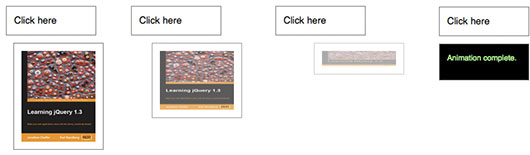
Note that the target value of the height property is 'toggle'. Since the image was visible before, the animation shrinks the height to 0 to hide it. A second click then reverses this transition:
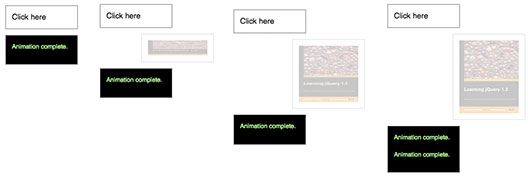
The opacity of the image is already at its target value, so this property is not animated by the second click. Since the target value for left is a relative value, the image moves even farther to the right during this second animation.
Directional properties (top, right, bottom, left) have no discernible effect on elements if their position style property is static, which it is by default.
Note: The jQuery UI project extends the .animate() method by allowing some non-numeric styles such as colors to be animated. The project also includes mechanisms for specifying animations through CSS classes rather than individual attributes.
Note: if attempting to animate an element with a height or width of 0px, where contents of the element are visible due to overflow, jQuery may clip this overflow during animation. By fixing the dimensions of the original element being hidden however, it is possible to ensure that the animation runs smoothly. A clearfix can be used to automatically fix the dimensions of your main element without the need to set this manually.
Step Function
The second version of .animate() provides a step option — a callback function that is fired at each step of the animation. This function is useful for enabling custom animation types or altering the animation as it is occurring. It accepts two arguments (now and fx), and this is set to the DOM element being animated.
-
now: the numeric value of the property being animated at each step -
fx: a reference to thejQuery.fxprototype object, which contains a number of properties such aselemfor the animated element,startandendfor the first and last value of the animated property, respectively, andpropfor the property being animated.
Note that the step function is called for each animated property on each animated element. For example, given two list items, the step function fires four times at each step of the animation:
|
1
2
3
4
5
6
7
8
9
|
|
Easing
The remaining parameter of .animate() is a string naming an easing function to use. An easing function specifies the speed at which the animation progresses at different points within the animation. The only easing implementations in the jQuery library are the default, called swing, and one that progresses at a constant pace, called linear. More easing functions are available with the use of plug-ins, most notably the jQuery UI suite.
Per-property Easing
As of jQuery version 1.4, you can set per-property easing functions within a single .animate() call. In the first version of .animate(), each property can take an array as its value: The first member of the array is the CSS property and the second member is an easing function. If a per-property easing function is not defined for a particular property, it uses the value of the .animate() method's optional easing argument. If the easing argument is not defined, the default swing function is used.
For example, to simultaneously animate the width and height with the swing easing function and the opacity with the linear easing function:
|
1
2
3
4
5
6
7
8
9
|
|
In the second version of .animate(), the options object can include the specialEasing property, which is itself an object of CSS properties and their corresponding easing functions. For example, to simultaneously animate the width using the linear easing function and the height using the easeOutBounce easing function:
|
1
2
3
4
5
6
7
8
9
10
11
12
13
14
15
|
|
As previously noted, a plugin is required for the easeOutBounce function.
Additional Notes:
-
All jQuery effects, including
.animate(), can be turned off globally by settingjQuery.fx.off = true, which effectively sets the duration to 0. For more information, see jQuery.fx.off.
Examples:
Example 1
Click the button to animate the div with a number of different properties.
|
1
2
3
4
5
6
7
8
9
10
11
12
13
14
15
16
17
18
19
20
21
22
23
24
25
26
27
28
29
30
31
32
33
34
35
|
|
Demo:
Example 2
Animates a div's left property with a relative value. Click several times on the buttons to see the relative animations queued up.
|
1
2
3
4
5
6
7
8
9
10
11
12
13
14
15
16
17
18
19
20
21
22
23
24
25
26
27
28
29
30
31
32
33
34
35
|
|
Demo:
Example 3
The first button shows how an unqueued animation works. It expands the div out to 90% width while the font-size is increasing. Once the font-size change is complete, the border animation will begin. The second button starts a traditional chained animation, where each animation will start once the previous animation on the element has completed.
|
1
2
3
4
5
6
7
8
9
10
11
12
13
14
15
16
17
18
19
20
21
22
23
24
25
26
27
28
29
30
31
32
33
34
35
36
37
38
39
40
41
42
43
44
45
46
47
48
49
50
51
52
53
54
55
56
57
58
59
60
61
62
63
64
65
|
|
Demo:
Example 4
Animates the first div's left property and synchronizes the remaining divs, using the step function to set their left properties at each stage of the animation.
|
1
2
3
4
5
6
7
8
9
10
11
12
13
14
15
16
17
18
19
20
21
22
23
24
25
26
27
28
29
30
31
32
33
34
35
36
37
38
39
40
41
42
|
|
Demo:
Example 5
Animate all paragraphs to toggle both height and opacity, completing the animation within 600 milliseconds.
|
1
2
3
4
|
|
Example 6
Animate all paragraphs to a left style of 50 and opacity of 1 (opaque, visible), completing the animation within 500 milliseconds.
|
1
2
3
4
|
|
Example 7
Animate the left and opacity style properties of all paragraphs; run the animation outside the queue, so that it will automatically start without waiting for its turn.
|
1
2
3
4
5
6
7
|
|
Example 8
An example of using an 'easing' function to provide a different style of animation. This will only work if you have a plugin that provides this easing function. Note, this code will do nothing unless the paragraph element is hidden.
|
1
2
3
|
|
Example 9
Animates all paragraphs to toggle both height and opacity, completing the animation within 600 milliseconds.
|
1
2
3
4
5
6
|
|
Example 10
Use an easing function to provide a different style of animation. This will only work if you have a plugin that provides this easing function.
|
1
2
3
4
5
6
|
|
Example 11
Animate all paragraphs and execute a callback function when the animation is complete. The first argument is an object of CSS properties, the second specifies that the animation should take 1000 milliseconds to complete, the third states the easing type, and the fourth argument is an anonymous callback function.
|
1
2
3
4
5
6
7
|
|